How to Send Out Emails: A Complete Guide for Success
February 28, 2026
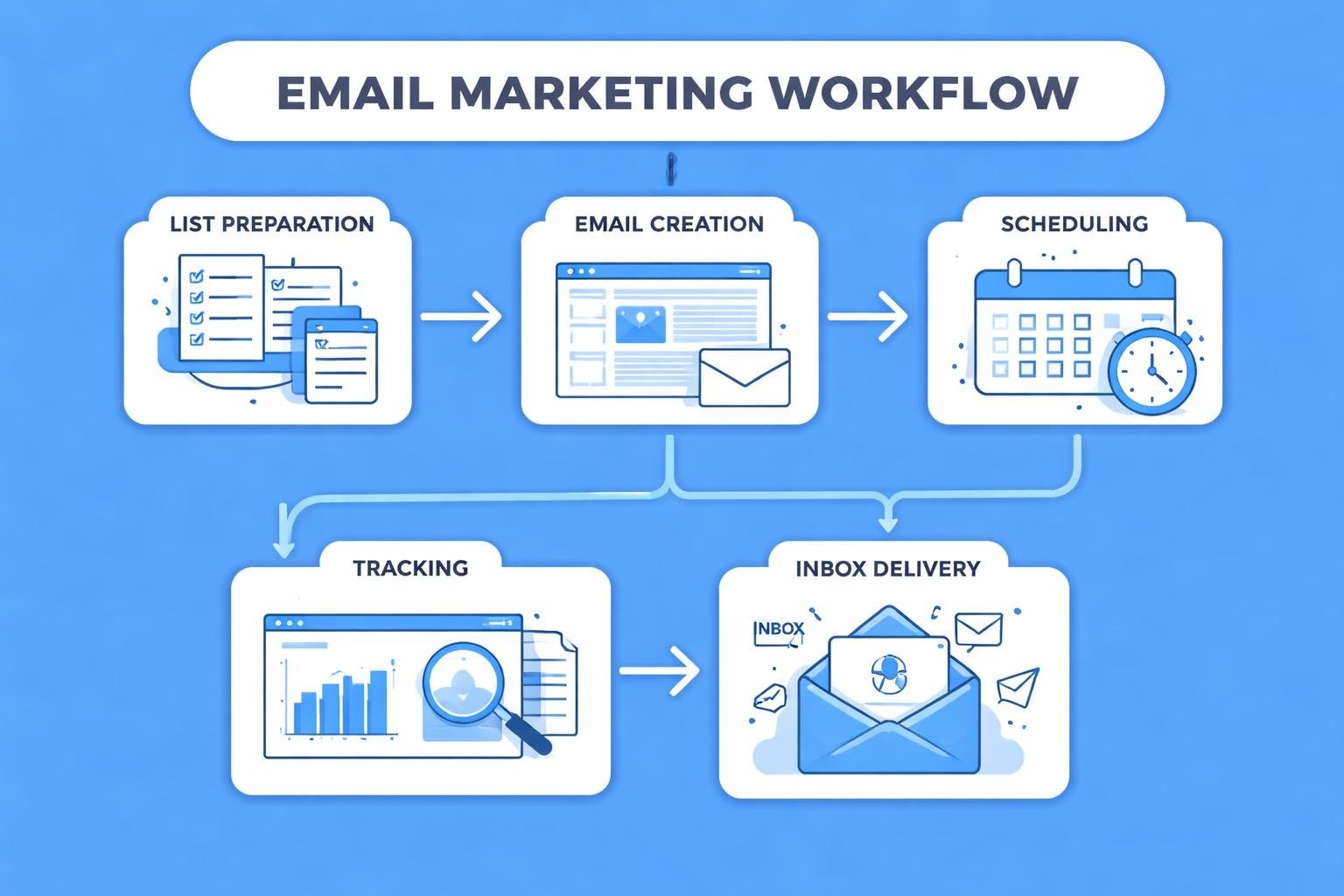
When you send out emails to your customers, subscribers, or prospects, you're engaging in one of the most powerful marketing channels available to small businesses. Yet the difference between emails that land in the inbox and drive results versus those that vanish into spam folders often comes down to understanding the technical requirements, best practices, and strategic approaches that govern successful email delivery. This comprehensive guide explores everything you need to know to send out emails that reach their destination, engage your audience, and deliver measurable business value.
Understanding Email Deliverability Fundamentals
Before you send out emails to your list, you must grasp the critical concept of deliverability. This refers to your ability to successfully land messages in recipients' inboxes rather than spam folders or blocked entirely by email service providers.
Authentication Protocols Matter
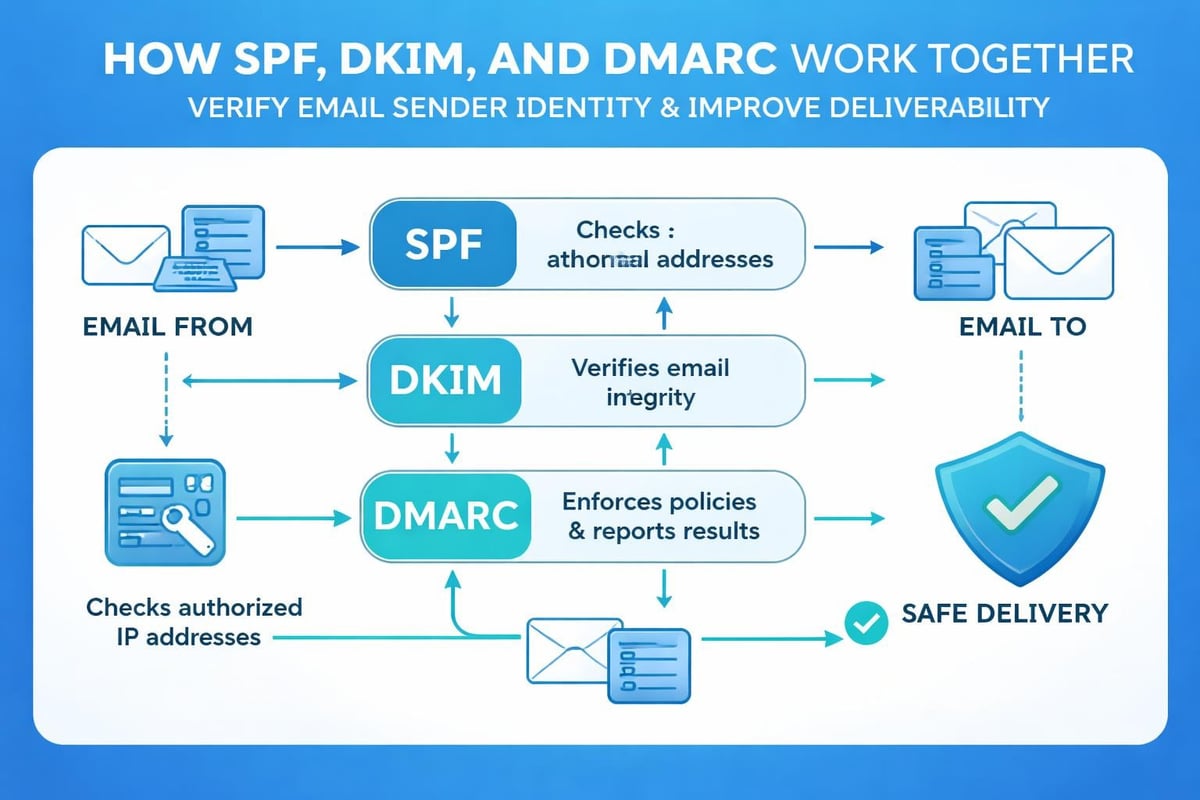
Email authentication serves as your digital passport. Internet service providers (ISPs) verify your identity through three primary protocols:
- SPF (Sender Policy Framework) validates that your sending server is authorised to send on behalf of your domain
- DKIM (DomainKeys Identified Mail) adds a digital signature to verify message integrity
- DMARC (Domain-based Message Authentication) tells receiving servers how to handle emails that fail authentication
Without proper authentication, even legitimate campaigns face rejection. Email sender accreditation provides third-party verification that helps bypass stringent filters, particularly valuable for businesses sending high volumes.
Reputation Management
Your sender reputation functions like a credit score for email. ISPs track your sending patterns, complaint rates, bounce rates, and engagement metrics to determine whether to deliver your messages.
When you consistently send out emails that recipients want, your reputation improves. Conversely, high complaint rates or sending to invalid addresses damages your standing. Monitoring your sender score through various tools helps you identify issues before they become critical.
Building and Maintaining Quality Email Lists
The foundation of successful email marketing lies in list quality. You cannot purchase your way to email success with bought lists; you must earn subscriber trust through permission-based marketing.
Permission-Based List Growth
Modern email marketing operates on explicit consent. When you send out emails to people who haven't opted in, you violate both best practices and regulations like the CAN-SPAM Act of 2003.
Strategies for organic list building include:
- Website opt-in forms positioned strategically throughout your site
- Lead magnets offering valuable resources in exchange for email addresses
- Social media campaigns directing followers to sign-up pages
- In-person events collecting business cards with follow-up permission
- Referral programmes incentivising existing subscribers to share
Double opt-in confirmation adds an extra verification step, ensuring higher quality subscribers and better engagement rates. Understanding why you need a business email helps establish credibility from the first touchpoint.
List Hygiene Practices
Regular list maintenance ensures you send out emails only to engaged, valid addresses. Implement these hygiene practices quarterly:
| Practice | Frequency | Impact |
|---|---|---|
| Remove hard bounces | Immediately | Protects sender reputation |
| Suppress chronic complainers | After 1-2 complaints | Reduces future complaint rates |
| Re-engage inactive subscribers | Every 6 months | Identifies interested recipients |
| Validate email syntax | Before import | Prevents obvious errors |
| Remove unengaged users | After 12 months | Improves overall metrics |
The principle remains simple: smaller, engaged lists outperform larger, disinterested ones. Email deliverability best practices emphasise quality over quantity for sustained success.
Crafting Emails That Pass Filters
Technical compliance represents only half the equation. The content you create determines whether ISPs and recipients perceive your messages as valuable or spam.
Subject Line Optimisation
Your subject line serves as the gatekeeper to email opens. When you send out emails, this single element dramatically influences performance.
Avoid these red flags:
- ALL CAPS TEXT or excessive punctuation!!!
- Misleading claims that don't match email content
- Spam trigger words like "FREE", "Guaranteed", or "Act now"
- Excessive emojis or special characters
Embrace these strategies:
- Personalisation using recipient names or preferences
- Curiosity-driven language that promises value
- Clear benefit statements
- A/B testing to identify what resonates
Keeping subject lines between 40-50 characters ensures mobile compatibility, where most people now read emails.
Email Body Best Practices
The content within your email requires equal attention. Common rookie mistakes include using overly promotional language, poor formatting, and neglecting mobile optimisation.
Structure your emails with:
- A compelling preheader text that extends your subject line
- Clear, scannable headlines breaking up content sections
- Short paragraphs of 2-3 sentences maximum
- Bullet points for easy information consumption
- A single, prominent call-to-action button
- Professional images optimised for fast loading
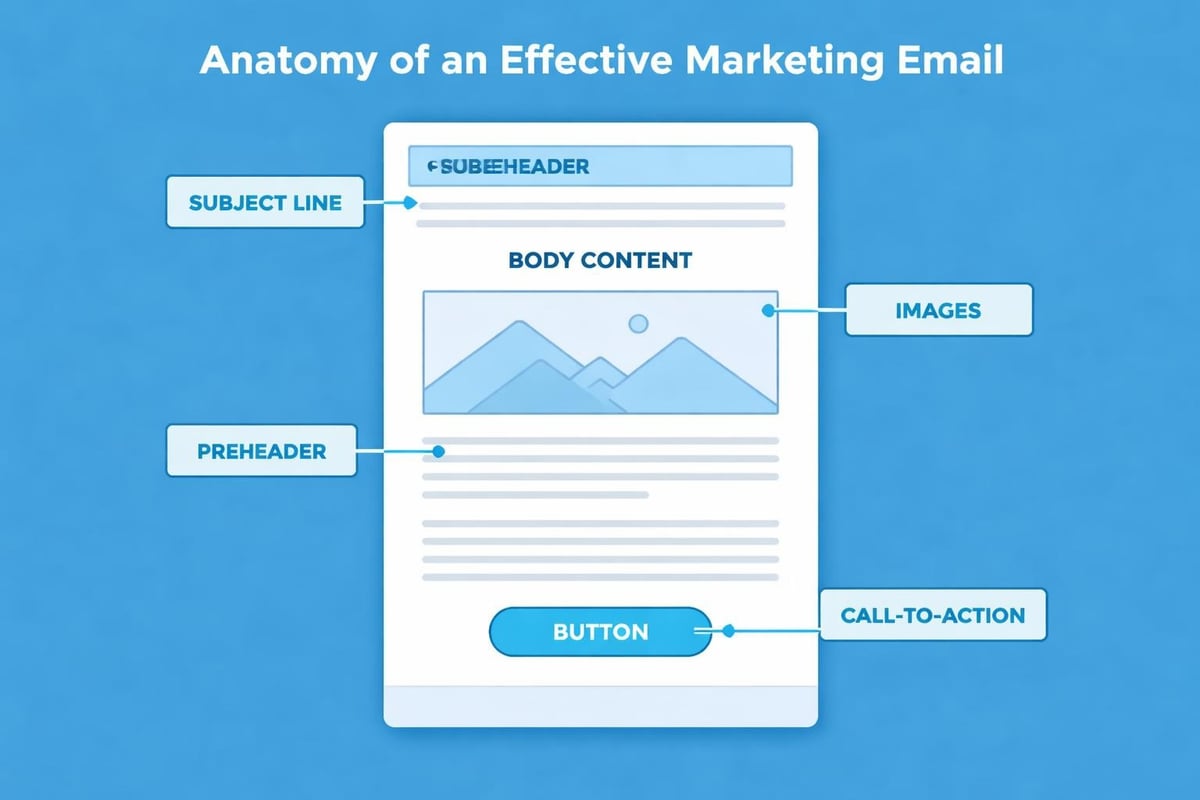
Maintaining a healthy text-to-image ratio (approximately 60:40) prevents spam filter triggers. Pure image emails often fail to render properly or raise suspicion.
Compliance and Legal Requirements
When you send out emails for commercial purposes, you must comply with anti-spam legislation across various jurisdictions.
CAN-SPAM Compliance Checklist
United States law requires specific elements in every commercial email:
- Accurate "From" and "Reply-to" information reflecting your business
- Clear subject lines that accurately represent email content
- Identification of the message as an advertisement (when applicable)
- Valid physical postal address of your business
- Conspicuous unsubscribe mechanism in every email
- Processing of opt-out requests within 10 business days
Your antispam policy should outline how you comply with these requirements and protect recipient rights.
GDPR and Privacy Considerations
European subscribers require additional protections under GDPR regulations. Before you send out emails to EU residents, ensure you have:
- Explicit consent documented with timestamp and method
- Clear privacy policies explaining data usage
- Easy access for subscribers to view, modify, or delete their data
- Breach notification procedures if data is compromised
Maintaining detailed records of how and when subscribers joined your list provides essential protection if compliance questions arise.
Timing and Frequency Strategies
Knowing when and how often to send out emails significantly impacts engagement rates and subscriber satisfaction.
Optimal Sending Times
Research consistently shows certain time windows perform better for email engagement:
| Day | Best Times (GMT) | Open Rate Impact |
|---|---|---|
| Tuesday | 10:00, 14:00 | +18% above average |
| Wednesday | 10:00, 14:00 | +15% above average |
| Thursday | 10:00, 15:00 | +12% above average |
| Saturday | 09:00 | +10% for B2C |
| Monday | 10:00 | Average |
However, your specific audience may differ. Test sending times using your platform's analytics to identify patterns unique to your subscribers. Features like timed email send capabilities allow precise scheduling for maximum impact.
Finding the Right Frequency
Email frequency represents a delicate balance. Send too rarely and subscribers forget they opted in; too frequently and you trigger unsubscribes.
Start with this framework:
- Welcome series: Daily for 3-5 days after subscription
- Regular newsletters: Weekly or bi-weekly
- Promotional campaigns: Monthly, with exceptions for major events
- Transactional emails: As needed, based on user actions
Survey your audience periodically to understand their preferences. Some segments appreciate daily emails whilst others prefer monthly updates.
Technical Setup for Successful Sending
The infrastructure behind your email campaigns determines delivery success before content quality even enters the equation.
Choosing Email Service Providers
Professional email marketing platforms provide tools that individual email clients cannot match. When you send out emails through dedicated services, you gain:
- Bulk sending capabilities without triggering ISP limits
- Template builders for consistent, professional design
- List management and segmentation tools
- Detailed analytics tracking opens, clicks, and conversions
- Automated workflows for welcome series and drip campaigns
Email marketing for small businesses requires platforms that balance affordability with essential features. Evaluate providers based on deliverability rates, ease of use, and customer support quality.
Warming Up New Sending Domains
When you send out emails from a new domain or IP address, you lack established sender reputation. ISPs treat you with suspicion until you prove legitimacy.
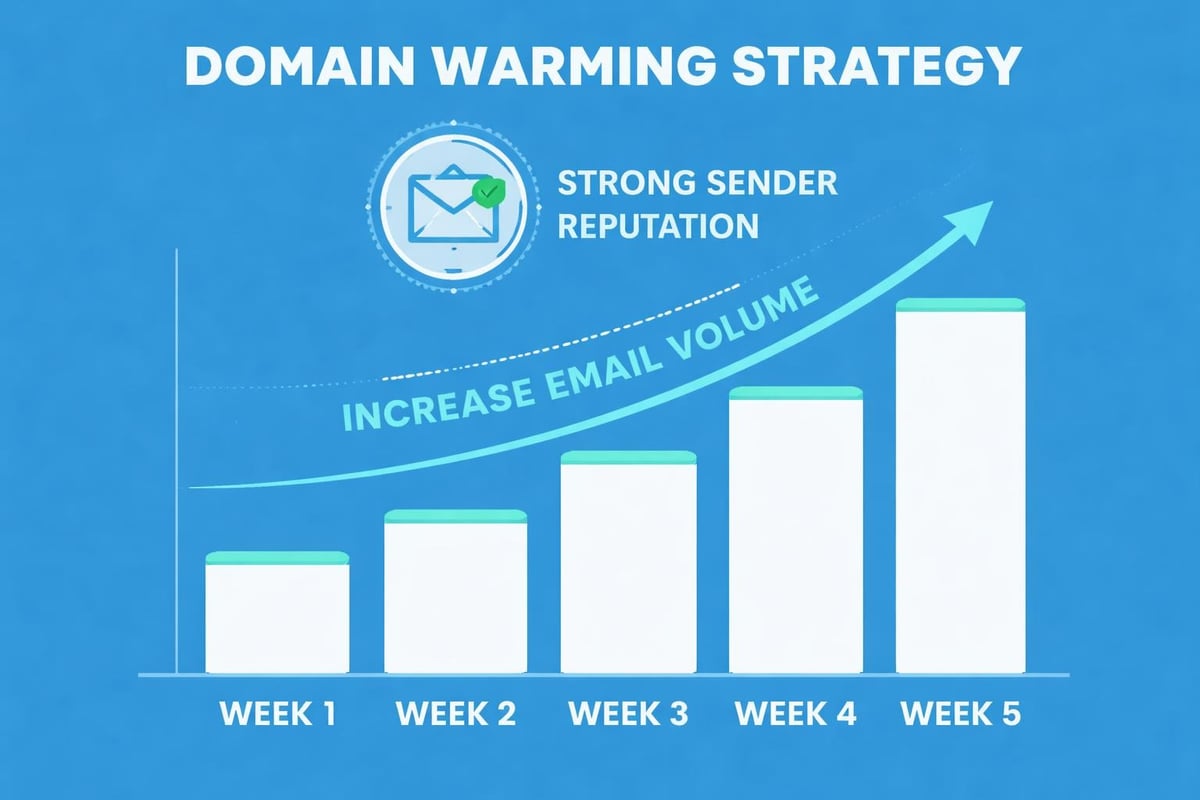
Domain warming involves gradually increasing sending volume:
- Week 1: Send to 50-100 most engaged subscribers
- Week 2: Increase to 500 subscribers
- Week 3: Expand to 2,000 subscribers
- Week 4: Send to 10,000 subscribers
- Week 5+: Full list deployment
This gradual approach demonstrates natural sending patterns and builds positive reputation signals before scaling to full capacity.
Segmentation and Personalisation Techniques
Generic, one-size-fits-all emails underperform compared to targeted, personalised messages. When you send out emails tailored to specific audience segments, engagement metrics improve dramatically.
Effective Segmentation Strategies
Divide your list based on meaningful characteristics:
- Demographics: Age, location, job title, company size
- Behavioural data: Purchase history, website activity, email engagement
- Lifecycle stage: New subscribers, active customers, lapsed users
- Preferences: Product interests, content topics, email frequency
- Engagement level: Highly active, moderately active, inactive
Creating segments allows you to craft messages addressing specific needs, pain points, and interests rather than speaking generically to everyone.
Personalisation Beyond First Names
Whilst inserting subscriber names remains common practice, advanced personalisation goes further. Modern platforms enable you to send out emails incorporating:
- Product recommendations based on browsing history
- Location-specific offers and event invitations
- Content matched to stated preferences or past behaviour
- Abandoned cart reminders with specific products
- Anniversary or birthday messages with special offers
Dynamic content blocks change email elements based on recipient data, allowing a single template to serve multiple segments effectively.
Testing and Optimisation Frameworks
Continuous improvement separates exceptional email marketers from average ones. When you send out emails, testing reveals what resonates with your specific audience.
A/B Testing Methodology
Systematic testing identifies performance drivers. Test one variable at a time:
- Subject lines: Compare two variations on 20% of your list
- Send times: Split your list between morning and afternoon sends
- Call-to-action: Test button colour, copy, or placement
- Email length: Compare concise versus detailed versions
- Personalisation: Measure impact of personalised elements
Email marketing best practices recommend running tests on list segments large enough to achieve statistical significance, typically 1,000+ recipients per variation.
Key Metrics to Monitor
Track these essential performance indicators:
| Metric | Industry Average | What It Measures |
|---|---|---|
| Open rate | 15-25% | Subject line effectiveness |
| Click-through rate | 2-5% | Content relevance and CTA strength |
| Conversion rate | 1-3% | Overall campaign effectiveness |
| Bounce rate | <2% | List quality |
| Unsubscribe rate | <0.5% | Content alignment with expectations |
| Complaint rate | <0.1% | Audience permission and satisfaction |
When rates fall outside these benchmarks, investigate contributing factors and adjust accordingly. The ultimate guide to email deliverability provides comprehensive frameworks for monitoring and improving these metrics.
Automation and Workflow Development
Strategic automation ensures you send out emails at precisely the right moments without manual intervention for every message.
Essential Automated Campaigns
Implement these foundational workflows:
- Welcome series: Introduce new subscribers to your brand across 3-5 emails
- Abandoned cart: Remind shoppers of items left unpurchased
- Post-purchase: Thank customers and request reviews or referrals
- Re-engagement: Win back inactive subscribers before removing them
- Birthday/anniversary: Celebrate milestones with personalised offers
Each workflow should map to specific subscriber actions or time triggers, creating relevant touchpoints throughout the customer journey.
Creating Effective Drip Campaigns
Drip campaigns nurture leads through educational content delivered over time. When you send out emails in carefully sequenced series, you guide prospects toward purchase decisions without overwhelming them.
Structure drip campaigns around:
- Educational phase: Teach subscribers about problems you solve
- Solution phase: Introduce your product or service as the answer
- Proof phase: Share case studies, testimonials, and results
- Offer phase: Present compelling reasons to purchase now
- Follow-up phase: Address objections and provide support
Spacing emails 2-4 days apart maintains momentum without excessive frequency. Understanding how to create and send emails efficiently through automation saves time whilst improving consistency.
Mobile Optimisation Requirements
With over 60% of emails opened on mobile devices in 2026, mobile optimisation is non-negotiable. When you send out emails that display poorly on smartphones, you immediately lose a majority of potential engagement.
Mobile-Friendly Design Principles
Ensure your emails work seamlessly across devices:
- Responsive templates that adapt to screen sizes automatically
- Single-column layouts that avoid horizontal scrolling
- Large, tappable buttons (minimum 44x44 pixels)
- Readable font sizes (minimum 14px for body text)
- Compressed images that load quickly on cellular connections
Test emails on multiple devices and email clients before sending. Platforms providing test email clients functionality help identify rendering issues across environments.
Simplified Mobile Content
Mobile readers consume content differently than desktop users. Adapt your approach:
- Front-load key information in the first paragraph
- Use shorter subject lines (30-40 characters for mobile)
- Reduce total email length by 30-40% compared to desktop versions
- Place your primary call-to-action above the fold
- Minimise image count to improve load times
When subscribers can quickly understand your message and take action from their phones, conversion rates increase substantially.
Deliverability Monitoring and Troubleshooting
Even with perfect setup, deliverability issues occasionally arise. Proactive monitoring helps you send out emails consistently whilst catching problems early.
Warning Signs of Deliverability Problems
Watch for these indicators that your emails aren't reaching inboxes:
- Sudden drops in open rates (20%+ decrease)
- Increasing bounce rates above 2%
- Rising complaint or unsubscribe rates
- Decreased click-through rates despite consistent content
- Blacklist appearances in monitoring tools
Email deliverability tips emphasise avoiding purchased lists and maintaining engagement focus to prevent these issues.
Recovery Strategies
If deliverability declines, take immediate action:
- Pause sending to prevent further reputation damage
- Identify root causes through bounce analysis and spam checker tools
- Clean your list aggressively, removing problematic addresses
- Review content for spam triggers or misleading elements
- Reconnect with engaged subscribers through re-engagement campaigns
- Gradually resume sending volume following warming protocols
Reputation recovery takes time, but consistent adherence to best practices eventually restores inbox placement.
Advanced Strategies for Maximum Impact
Once you've mastered fundamentals, advanced techniques help you send out emails that significantly outperform industry averages.
Interactive Email Elements
Modern email clients support interactive features that boost engagement:
- Accordions that expand to reveal additional content
- Image carousels showcasing multiple products
- Embedded videos playing directly within emails
- Survey questions collecting feedback without clicks
- Add-to-calendar buttons for event invitations
Whilst not universally supported, these elements create memorable experiences for subscribers using compatible clients whilst gracefully degrading for others.
Predictive Sending and AI Optimisation
Artificial intelligence analyses individual subscriber behaviour to determine optimal sending times. Rather than sending to everyone simultaneously, systems deliver each email when that specific recipient is most likely to engage.
Additional AI applications include:
- Subject line generation based on performance data
- Content recommendations personalised to individual preferences
- Churn prediction identifying at-risk subscribers
- Send frequency optimisation for each contact
As you send out emails using these technologies, expect incremental performance improvements accumulating to substantial gains.
Integration With Broader Marketing Efforts
Email marketing delivers maximum value when coordinated with other channels rather than operating in isolation.
Cross-Channel Coordination
Align email campaigns with:
- Social media: Share email content on platforms and use social to grow lists
- Content marketing: Distribute blog posts and resources via email
- Paid advertising: Retarget email subscribers with coordinated ad messaging
- Events: Send out emails promoting webinars, conferences, or store visits
- Direct mail: Reinforce physical mail with email follow-up
Consistent messaging across touchpoints reinforces brand recognition and drives higher conversion rates than disconnected efforts.
CRM Integration Benefits
Connecting your email platform with customer relationship management systems enables sophisticated targeting. When you send out emails informed by complete customer data, relevance improves dramatically.
CRM integration provides:
- Purchase history informing product recommendations
- Service interactions triggering appropriate follow-up emails
- Sales pipeline stages determining nurture campaign enrollment
- Customer lifetime value segments receiving tailored offers
- Support ticket status updates delivered automatically
This integration transforms email from a broadcast channel into a personalised communication tool. Resources about business email for small businesses help establish professional infrastructure supporting these integrations.
Successfully managing how you send out emails requires balancing technical infrastructure, content quality, legal compliance, and strategic thinking. Small businesses that implement these practices build sustainable email programmes generating consistent revenue whilst maintaining positive subscriber relationships. Astonish Email provides email marketing solutions specifically designed for small businesses, offering the tools, deliverability, and support needed to execute these strategies effectively without enterprise-level complexity or cost.