New Business Email Account: Your Complete Setup Guide
April 16, 2026
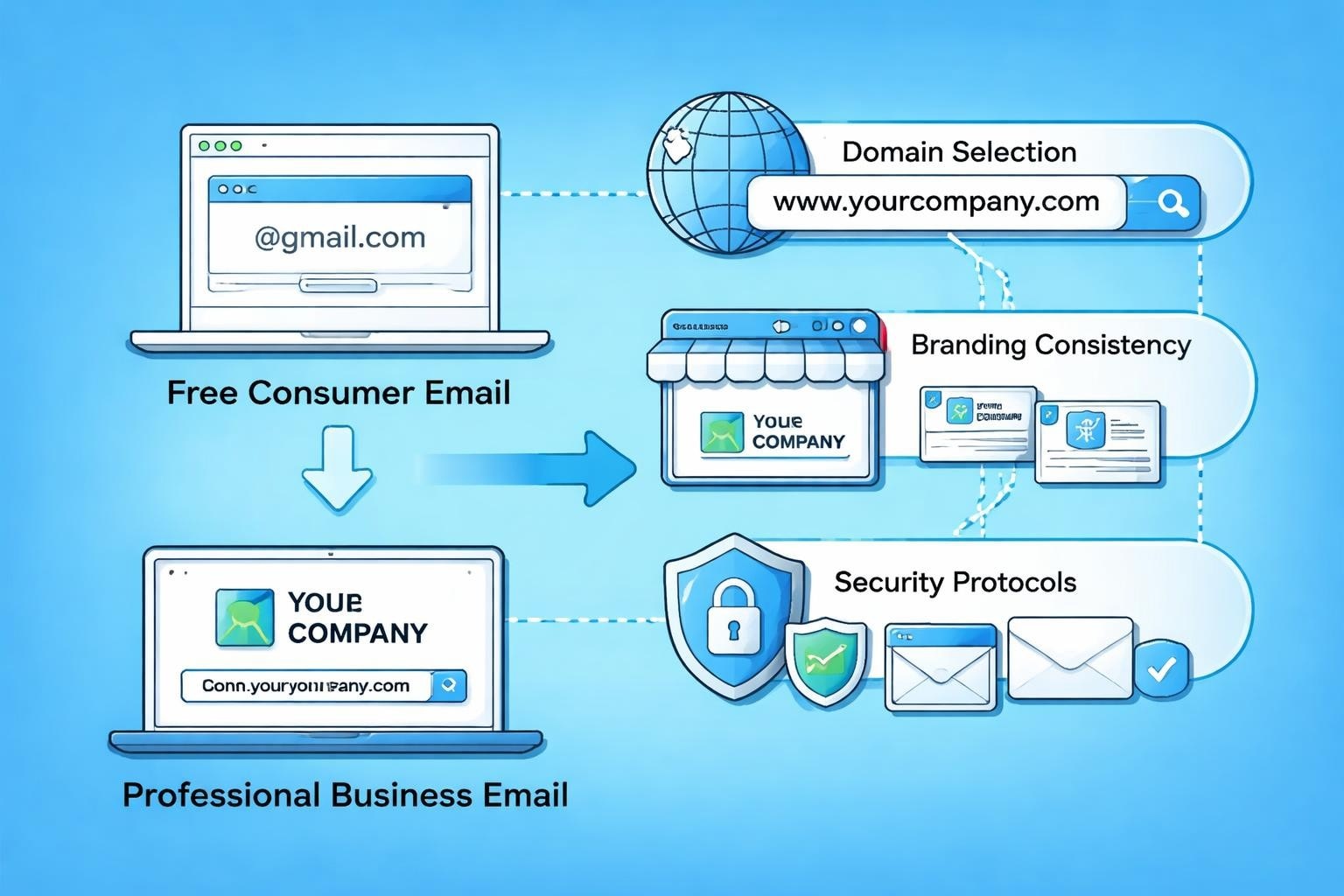
Establishing a new business email account represents a pivotal moment in your company's professional journey. Whether you're launching a startup, rebranding an existing enterprise, or simply upgrading from personal email addresses, the decisions you make during this process will affect your business communications for years to come. A properly configured business email system enhances credibility, protects sensitive information, and streamlines team collaboration whilst reflecting the professional image your organisation deserves.
Choosing the Right Email Provider for Your Business
Selecting an appropriate email provider forms the foundation of your professional communication infrastructure. The decision extends beyond simple message delivery-it encompasses security features, storage capacity, integration capabilities, and scalability to accommodate future growth.
Modern business email providers typically offer:
- Custom domain integration (yourname@yourcompany.co.uk)
- Advanced spam filtering and malware protection
- Generous storage allocations (typically 30GB to unlimited)
- Mobile synchronisation across devices
- Calendar and contact management
- Team collaboration features
When evaluating potential providers, consider the comprehensive comparison of email services available in 2026. The marketplace has evolved considerably, with traditional giants like Microsoft 365 and Google Workspace competing alongside specialised solutions that cater to specific business needs.
Domain-Based Email Versus Free Services
Free email services like Gmail or Outlook.com serve personal communications adequately, but they fall short for professional business use. A new business email account built on your company domain (info@yourbusiness.co.uk) immediately conveys legitimacy and professionalism.
Recipients perceive domain-based emails as more trustworthy, whilst free email addresses can trigger spam filters or suggest amateur operations. This perception matters significantly when establishing relationships with potential clients, investors, or partners who scrutinise every detail of your professional presentation.
| Feature | Free Email Service | Business Email Account |
|---|---|---|
| Custom Domain | No | Yes |
| Professional Image | Limited | Strong |
| Advanced Security | Basic | Enhanced |
| Team Collaboration | Minimal | Comprehensive |
| Technical Support | Community forums | Dedicated assistance |
| Storage | 15GB typical | 30GB+ per user |
Planning Your Email Account Structure
Strategic planning before creating your new business email account prevents future complications and ensures consistency across your organisation. This preparatory phase requires thoughtful consideration of naming conventions, departmental needs, and growth projections.
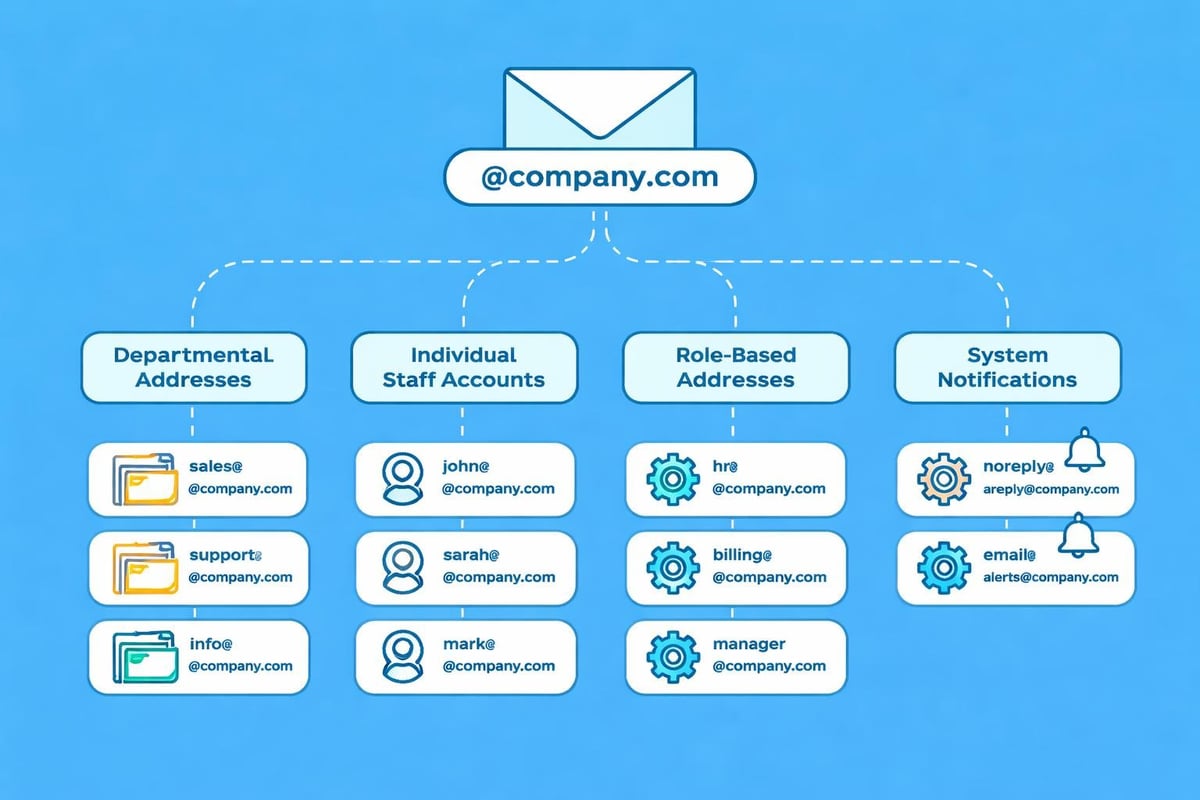
Start by documenting all required email addresses. Most businesses need multiple accounts beyond individual staff addresses: info@, sales@, support@, billing@, and marketing@ represent common departmental addresses. Creating a comprehensive list now prevents gaps in your communication infrastructure later.
Establishing Naming Conventions
Consistency in email address formatting strengthens brand recognition and simplifies internal organisation. Implementing standardised email formats across your company ensures professional presentation and reduces confusion.
Common naming convention options include:
- firstname.lastname@company.co.uk (most professional)
- firstnamelastname@company.co.uk (compact alternative)
- firstinitiallastname@company.co.uk (for larger teams)
- lastname@company.co.uk (executive level)
Whatever format you choose, maintain consistency throughout your organisation. Mixed formats appear unprofessional and complicate email management. Document your chosen convention in company guidelines to ensure future employees receive appropriately formatted addresses.
Configuring Security Settings and Policies
Security configuration represents the most critical aspect of establishing a new business email account. Email remains the primary vector for cyberattacks, with phishing attempts, malware distribution, and data breaches targeting businesses of all sizes. Developing robust email security policies protects your organisation from these evolving threats.
Implementing multi-factor authentication (MFA) should be your first security priority. MFA requires users to verify their identity through multiple methods-typically a password plus a mobile device confirmation-dramatically reducing unauthorised access risks even if passwords become compromised.
Essential Security Measures
Beyond MFA, comprehensive security requires layered protections that address various threat vectors. Modern email security encompasses technical controls, user education, and organisational policies working in concert.
- Encryption protocols: Ensure TLS/SSL encryption for data in transit
- Spam filtering: Configure advanced filters to block malicious messages
- Attachment scanning: Implement automatic malware detection
- Password policies: Enforce strong passwords with regular rotation
- Access controls: Limit administrative privileges appropriately
- Backup systems: Maintain regular email data backups
Email security best practices for small businesses emphasise education alongside technical controls. Staff training on recognising phishing attempts, avoiding suspicious links, and reporting security incidents creates a human firewall complementing technological defences.
Understanding your platform's antispam policy helps maintain good sending reputation whilst protecting your inbox from unwanted messages.
Technical Setup Process Step-by-Step
Creating your new business email account involves several technical configurations that ensure proper functionality and deliverability. Following a structured approach prevents common pitfalls that could disrupt business communications.
The setup process typically includes:
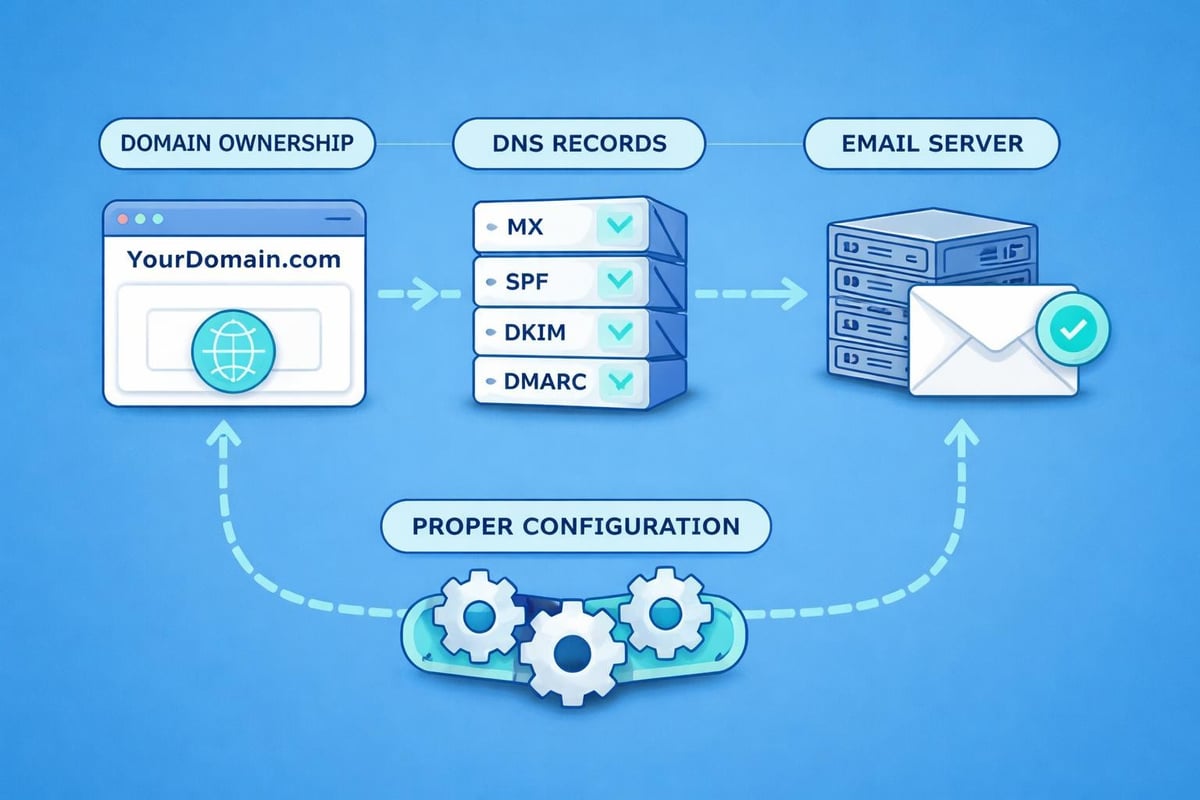
- Domain verification: Prove ownership of your domain through DNS records
- MX record configuration: Direct incoming mail to your email servers
- SPF record creation: Specify authorised sending servers
- DKIM implementation: Add cryptographic signatures to outgoing messages
- DMARC policy establishment: Define how recipients should handle authentication failures
These DNS configurations may appear technical, but most email providers offer guided setup wizards that simplify the process. Allocate 24-48 hours for DNS changes to propagate globally after configuration.
Mobile Device Configuration
Modern business communications demand seamless mobile access to your new business email account. Configuring email on smartphones and tablets enables responsive communication regardless of location, though this convenience introduces additional security considerations.
When setting up business email accounts on mobile devices, use native email applications or approved third-party clients rather than forwarding to personal accounts. Implement mobile device management (MDM) policies for organisations handling sensitive information, enabling remote data wiping if devices are lost or stolen.
Organising Email Management Systems
Effective email management transforms your new business email account from a potential productivity drain into a streamlined communication tool. Establishing organisational systems from the outset prevents the inbox chaos that plagues many professionals.
Achieving inbox zero requires systematic approaches to message processing. Rather than allowing emails to accumulate indefinitely, implement decision-making frameworks that categorise each message upon arrival.
Folder Structure and Filtering Rules
Creating a logical folder hierarchy enables efficient email retrieval whilst keeping your inbox manageable. Structure folders by project, client, department, or priority level depending on your workflow requirements.
| Folder Category | Purpose | Retention Period |
|---|---|---|
| Active Projects | Current work correspondence | Duration + 6 months |
| Client Archives | Historical client communications | 3-7 years |
| Administrative | HR, finance, legal documents | Per regulatory requirements |
| Marketing | Campaigns, newsletters, promotions | 1-2 years |
| Completed | Finished projects, outdated information | Review annually |
Automated filtering rules route incoming messages to appropriate folders based on sender, subject keywords, or other criteria. This automation reduces manual sorting whilst ensuring important messages receive immediate attention. When establishing a new business email address, configure these rules early to maintain organisation from day one.
Integration with Business Tools
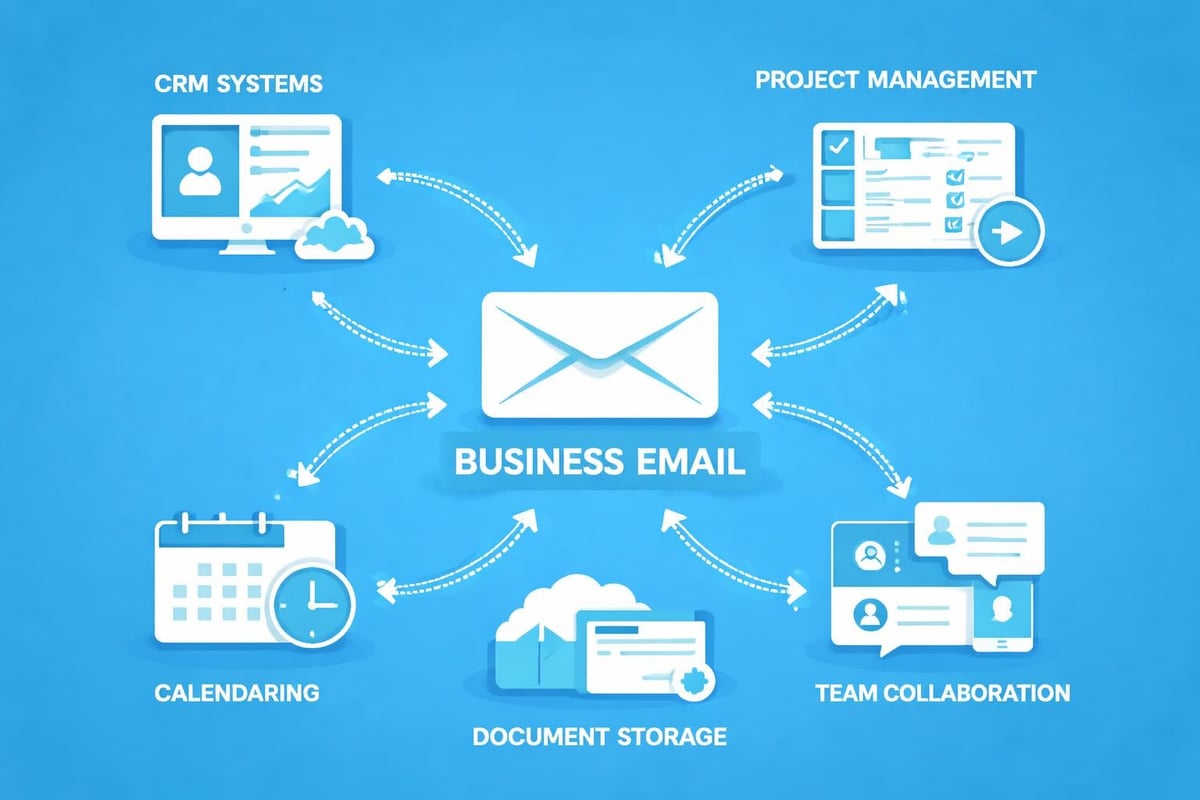
Your new business email account should integrate seamlessly with existing business software, creating a unified workflow that enhances productivity. Modern email systems serve as communication hubs connecting various aspects of business operations.
Common integration opportunities include:
- Customer relationship management (CRM) platforms
- Project management software
- Calendar and scheduling applications
- Document storage systems
- Accounting and invoicing tools
- Team collaboration platforms
These integrations eliminate data silos, reduce duplicate entry, and provide comprehensive views of customer interactions. For businesses using email marketing platforms, integration between operational email and marketing systems streamlines campaign management whilst maintaining clear separation between transactional and promotional communications.
Email Marketing Considerations
Whilst your new business email account handles day-to-day operational communications, marketing emails require specialised infrastructure. Getting started with email marketing involves dedicated platforms designed for bulk sending, list management, and campaign analytics.
Separating operational email from marketing campaigns protects your domain reputation. Sending marketing messages through standard business accounts risks triggering spam filters, damaging deliverability for critical business correspondence. Dedicated email marketing platforms like those offered through professional email services provide the infrastructure, compliance tools, and analytics required for effective campaigns.
Compliance and Data Retention
Regulatory compliance represents a crucial consideration when establishing your new business email account. Various industries face specific requirements governing email retention, encryption, and data handling practices.
Understanding your data retention obligations prevents legal complications whilst optimising storage costs. Retention periods vary significantly by industry, document type, and jurisdiction-financial services face stricter requirements than general businesses, whilst health information demands particular privacy protections.
GDPR and Privacy Regulations
Businesses operating in or communicating with EU residents must comply with General Data Protection Regulation (GDPR) requirements affecting email communications. These regulations mandate transparent data handling, user consent for marketing messages, and prompt responses to data access requests.
Implement clear privacy notices explaining how your business collects, uses, and protects email addresses. Provide straightforward unsubscribe mechanisms for marketing communications and maintain detailed records of consent. Planning comprehensive email security policies should incorporate privacy regulations alongside technical security measures.
Team Training and Onboarding
Technical configuration represents only half the equation-human factors determine whether your new business email account enhances or hinders productivity. Comprehensive staff training ensures team members understand proper email usage, security protocols, and communication standards.
Essential training topics include:
- Email etiquette and professional communication standards
- Security awareness and phishing recognition
- Efficient email management techniques
- Mobile device security protocols
- Data classification and handling requirements
- Signature formatting and branding consistency
Document these policies in an employee handbook or online knowledge base accessible for reference. Regular refresher training addresses evolving threats whilst reinforcing best practices across your organisation.
Creating Email Signatures
Professional email signatures provide consistent branding whilst offering recipients essential contact information. Standardised signatures across your organisation reinforce brand identity and ensure legal compliance with disclosure requirements.
Include relevant information without cluttering: full name, job title, company name, phone number, and website URL form the core elements. Add social media links, promotional banners, or legal disclaimers as appropriate for your industry. Many email providers offer signature templates simplifying consistent formatting across team members.
Monitoring Performance and Deliverability
Once your new business email account operates, ongoing monitoring ensures continued effectiveness. Email deliverability-the rate at which your messages reach intended recipients-requires active management to maintain optimal performance.
Monitor bounce rates, spam complaints, and engagement metrics to identify potential deliverability issues before they escalate. Sudden increases in bounces may indicate technical problems or outdated contact lists requiring cleaning. Rising spam complaints suggest content, frequency, or targeting adjustments needed.
| Metric | Healthy Range | Warning Signs | Action Required |
|---|---|---|---|
| Bounce Rate | <2% | 2-5% | >5% |
| Spam Complaints | <0.1% | 0.1-0.3% | >0.3% |
| Open Rate | 20-30% | 10-20% | <10% |
| Response Time | <4 hours | 4-24 hours | >24 hours |
Regular audits of your email system identify unused accounts, outdated distribution lists, and security vulnerabilities requiring attention. Quarterly reviews ensure your infrastructure scales appropriately with business growth whilst maintaining security standards.
Scaling Your Email Infrastructure
As your business expands, your email infrastructure must accommodate additional users, increased message volume, and evolving requirements. Planning for scalability when establishing your new business email account prevents disruptive migrations later.
Consider providers offering flexible pricing plans that accommodate growth without requiring platform changes. Transitioning email systems mid-operation introduces significant complications-lost messages, confused communications, and productivity disruptions during migration.
Budget for regular infrastructure assessments reviewing current capacity against projected needs. Storage requirements, user licences, security features, and integration capabilities should align with your strategic business objectives. Proactive planning enables smooth expansion rather than reactive scrambling when systems reach capacity.
Understanding how to get business email set up correctly from the beginning saves considerable time and resources compared to retrofitting inadequate systems later. Investment in proper infrastructure pays dividends through enhanced productivity, security, and professional image.
Establishing a new business email account requires careful planning, technical configuration, and ongoing management to deliver reliable professional communications. From selecting the right provider and configuring security measures to implementing organisational systems and training staff, each element contributes to an effective email infrastructure supporting your business objectives. Whether you're launching your first business account or upgrading existing systems, Astonish Email provides the email marketing tools and support small businesses need to communicate effectively with customers whilst maintaining professional standards throughout every interaction.