Easy Email: Simplifying Your Marketing Communication
June 01, 2026
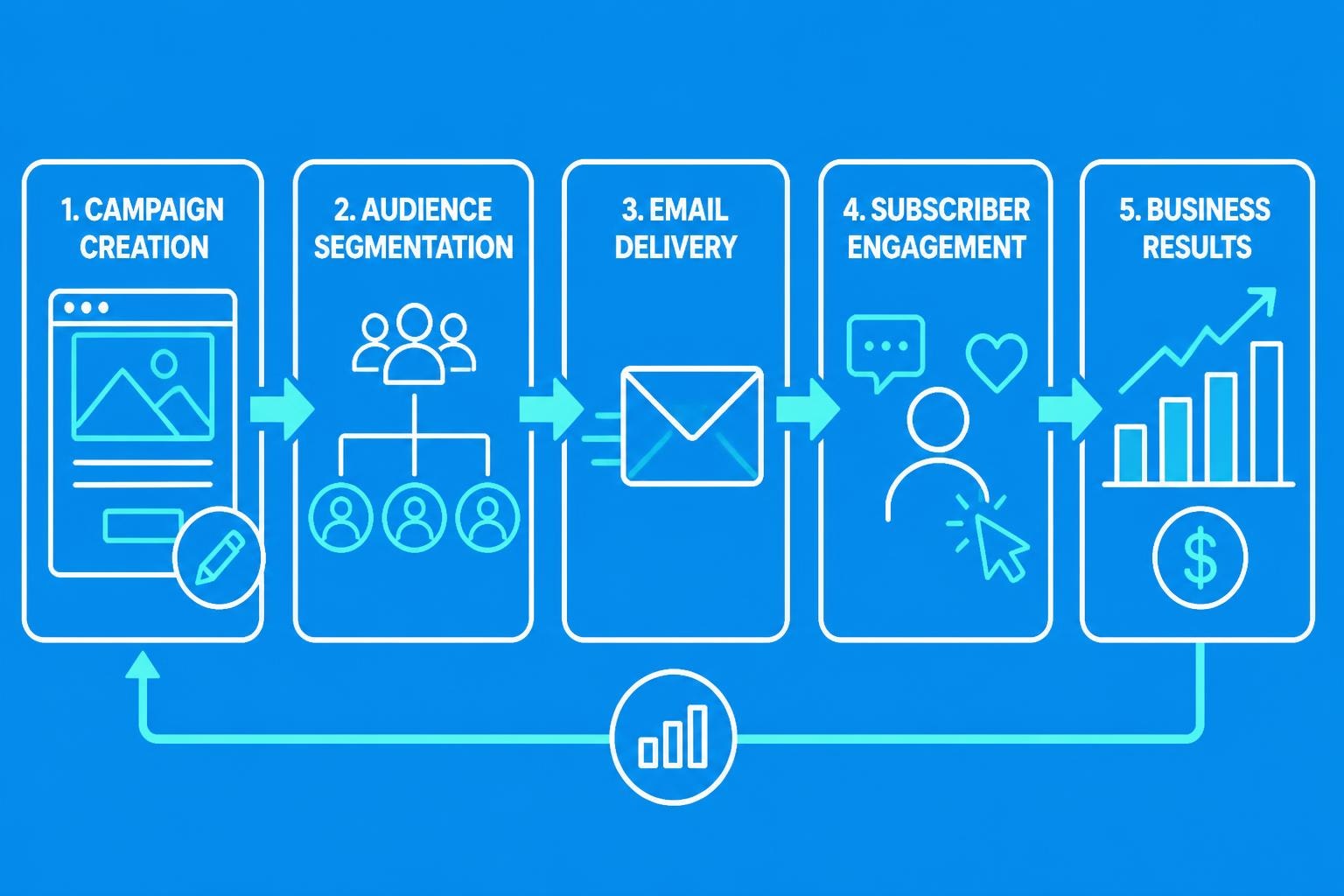
Email marketing doesn't need to be complicated. Small business owners often feel overwhelmed by the technical aspects of email campaigns, from list management to design and analytics. However, with the right approach and tools, creating effective email communications can become a straightforward process that drives real business results. Understanding how to make email marketing accessible whilst maintaining professional standards is essential for businesses looking to build lasting relationships with their customers in 2026.
Understanding the Fundamentals of Accessible Email Marketing
Creating an easy email strategy begins with understanding your core objectives. Unlike social media posts that disappear into algorithmic feeds, email provides direct access to your audience's inbox. This direct channel offers unparalleled opportunities for personalised communication when approached correctly.
Building Your Foundation
The groundwork for successful email marketing involves three essential components:
- List quality over quantity: Focus on engaged subscribers who genuinely want to hear from you
- Clear messaging hierarchy: Ensure every email has one primary purpose
- Consistent sending schedule: Train your audience to expect and anticipate your communications
Before launching campaigns, establish your brand voice and determine the types of content that resonate with your specific audience. Small businesses benefit most from authenticity rather than overly polished corporate messaging.
Permission-based marketing forms the backbone of ethical email practices. Every subscriber should have explicitly opted into your communications, which not only complies with regulations but also ensures better engagement rates. When people choose to receive your emails, they're already interested in what you have to offer.
Streamlining Email Creation Processes
Making email creation straightforward requires systematic approaches that eliminate unnecessary complexity. Many small business owners waste hours perfecting individual campaigns when templates and workflows could reduce this time significantly.
Template Systems That Work
Developing reusable templates transforms email production from a time-consuming task into a simple content-filling exercise. A well-designed template library should include:
- Welcome sequences for new subscribers
- Product or service announcements with clear calls-to-action
- Newsletter formats for regular updates
- Promotional campaigns for special offers
- Re-engagement emails for inactive subscribers
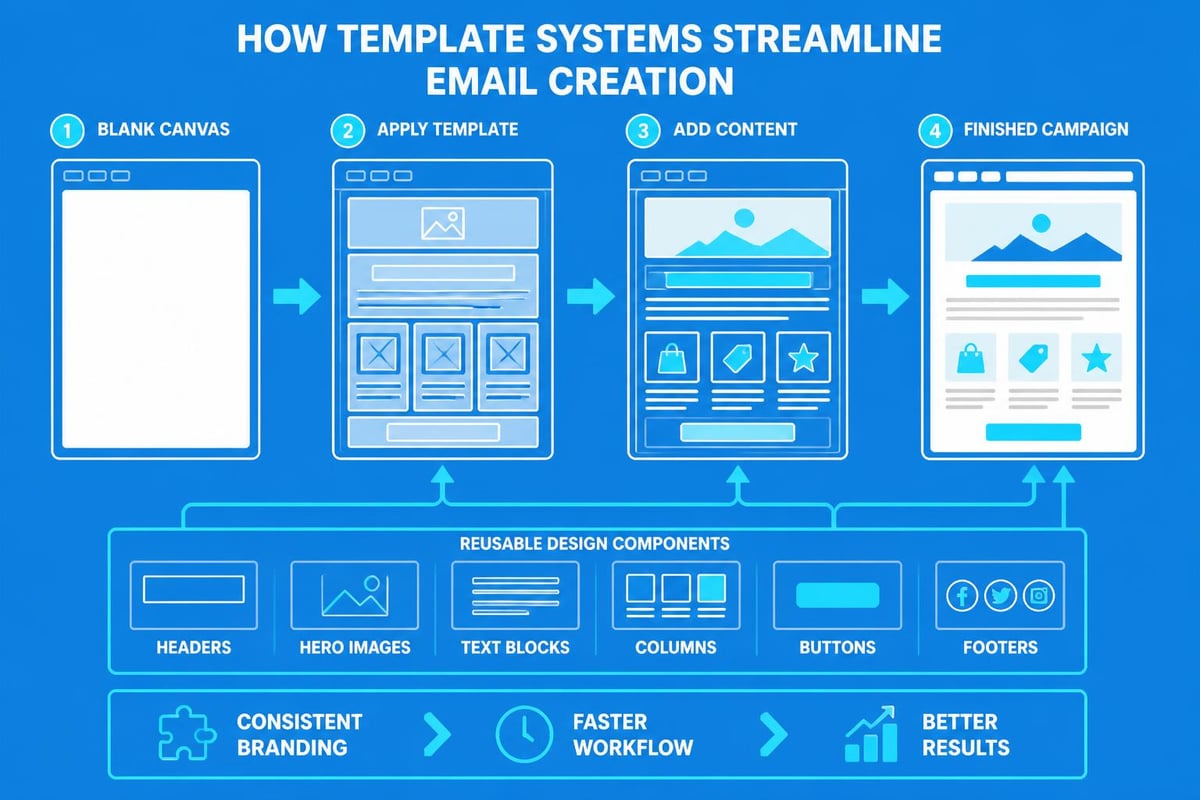
Each template should maintain brand consistency whilst allowing flexibility for different messaging needs. The University of California, Berkeley emphasises the importance of clarity and audience consideration in email communications, which templates help enforce through structured formats.
| Template Type | Primary Purpose | Ideal Send Frequency |
|---|---|---|
| Welcome Series | Onboard new subscribers | Triggered by signup |
| Newsletter | Maintain engagement | Weekly or fortnightly |
| Promotional | Drive specific actions | Monthly or seasonal |
| Transactional | Confirm actions | As needed |
| Re-engagement | Revive inactive contacts | Quarterly |
Content Creation Shortcuts
Efficient content creation doesn't mean sacrificing quality. Focus on frameworks that guide your writing:
The inverted pyramid approach places the most important information first, followed by supporting details. This structure respects your readers' time and ensures key messages land even if they only skim your content.
Bullet points and numbered lists improve scannability dramatically. Dense paragraphs deter readers, whilst organised lists encourage engagement. When crafting messages for your small business email campaigns, prioritise readability over literary complexity.
Design Principles for Simple Yet Effective Emails
Easy email design doesn't require advanced graphic design skills. By following established principles, anyone can create professional-looking campaigns that drive results.
Mobile-First Thinking
With over 60% of emails opened on mobile devices in 2026, designing for small screens isn't optional. Mobile-first design ensures your message displays correctly regardless of device.
Key considerations include:
- Single-column layouts that stack naturally
- Minimum font size of 14px for body text
- Touch-friendly buttons (minimum 44x44 pixels)
- Compressed images that load quickly
Benchmark Email's guide on designing professional email campaigns highlights mobile-first design as a critical success factor for modern email marketing.
Visual Hierarchy and Whitespace
Strategic whitespace guides readers' eyes through your content naturally. Cramming too much information into limited space creates visual confusion and reduces comprehension.
Establish hierarchy through:
- Headline size and weight: Your primary message should dominate visually
- Contrasting colours: Important elements should stand out from background content
- Sectional divisions: Clear breaks between topics or offers
- Directional cues: Arrows, borders, or positioning that guide attention
The balance between images and text matters enormously. Emails with too many images trigger spam filters, whilst text-only messages appear unprofessional. Benchmark Email recommends maintaining a balanced text-to-image ratio to optimise both deliverability and engagement.
Personalisation Without Complexity
Modern subscribers expect personalised experiences, but small businesses often lack resources for sophisticated segmentation. Fortunately, basic personalisation delivers substantial results without requiring complex technical implementation.
Data Points That Matter
You don't need extensive customer profiles to personalise effectively. Focus on readily available information:
- First name: Simple yet effective for subject lines and greetings
- Purchase history: Reference previous orders to suggest related products
- Engagement level: Segment active readers from occasional openers
- Signup source: Tailor content based on how they joined your list
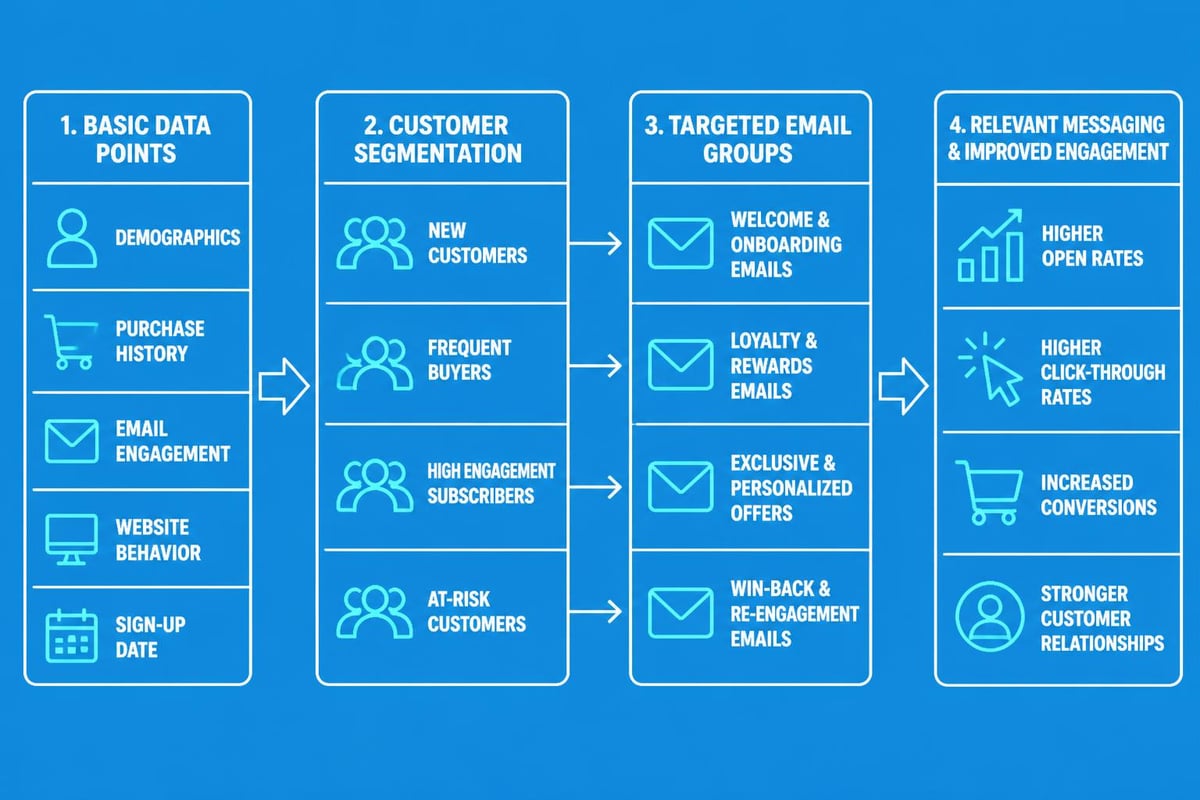
When creating your professional email strategy, start with name personalisation and expand gradually as you collect more subscriber data. Overly ambitious segmentation often leads to analysis paralysis rather than action.
Dynamic Content Blocks
Dynamic content allows different subscribers to see different elements within the same campaign. This approach streamlines campaign creation whilst maintaining personalisation.
Common applications include:
- Location-specific offers: Show relevant store information or regional promotions
- Gender-based product recommendations: Display items aligned with subscriber preferences
- Engagement-triggered content: Adjust messaging intensity based on interaction history
Subject Lines and Preview Text Optimisation
Your subject line determines whether subscribers open your email at all. Fortunately, writing compelling subject lines follows predictable patterns that anyone can learn.
Proven Subject Line Formulas
Rather than reinventing approaches for each campaign, leverage established formulas:
| Formula Type | Structure | Example |
|---|---|---|
| Curiosity Gap | Question or incomplete thought | "You're making this email mistake..." |
| Benefit-Driven | Clear value proposition | "Save 3 hours weekly with this approach" |
| Urgency | Time-sensitive offer | "24 hours left: exclusive discount inside" |
| Personalisation | Includes subscriber data | "Sarah, your custom recommendations" |
| Social Proof | References others' experiences | "Join 5,000 businesses using this method" |
Preview text acts as your second subject line, appearing beneath or alongside the main subject in most email clients. Carnegie Mellon University's email best practices guide emphasises the importance of clear communication from the very first impression, which includes both subject lines and preview text.
Never waste preview text with "View this email in your browser" or similar boilerplate. Instead, extend your subject line's promise or add complementary information that encourages opening.
Automation That Simplifies Workflows
Email automation represents the pinnacle of easy email marketing. Once configured, automated sequences work continuously without manual intervention, nurturing relationships whilst you focus on other business priorities.
Essential Automated Sequences
Every small business should implement these fundamental automation:
- Welcome series: Introduce new subscribers to your brand and set expectations
- Abandoned cart recovery: Remind potential customers about incomplete purchases
- Post-purchase follow-up: Thank customers and request feedback or reviews
- Birthday or anniversary emails: Celebrate milestones with special offers
- Win-back campaigns: Re-engage subscribers who haven't interacted recently
Setting up automation might seem daunting initially, but modern platforms make the process straightforward through visual workflow builders. When establishing your business email account, prioritise platforms that offer intuitive automation features.
Trigger-Based Messaging
Unlike scheduled broadcasts sent to everyone simultaneously, triggered emails respond to specific subscriber actions or behaviours. This relevance dramatically improves performance metrics.
Common triggers include:
- List subscription: Send immediate welcome email
- Link clicks: Follow up with related content or offers
- Purchase completion: Deliver confirmations and recommendations
- Inactivity periods: Attempt re-engagement after 30, 60, or 90 days
- Form submissions: Provide requested information or resources
Measuring Success With Simple Metrics
Analytics shouldn't require statistical expertise. Focus on metrics that directly inform decisions and ignore vanity numbers that don't drive improvement.
The Four Essential Metrics
Open rate indicates subject line effectiveness and sender reputation. Industry averages hover around 20-25% for most sectors, though this varies significantly by audience and niche.
Click-through rate measures content relevance and call-to-action effectiveness. This metric reveals whether your message resonates enough to drive action beyond passive reading.
Conversion rate tracks the percentage of recipients who complete your desired action, whether that's making a purchase, downloading a resource, or booking a consultation. This represents your ultimate success measure.
Unsubscribe rate signals content-audience fit. Whilst some attrition is natural, sudden spikes indicate messaging problems requiring immediate attention.
| Metric | Industry Benchmark | Action Threshold |
|---|---|---|
| Open Rate | 20-25% | Below 15%: Review subject lines |
| Click Rate | 2-5% | Below 1%: Reassess content relevance |
| Conversion Rate | 1-3% | Below 0.5%: Evaluate offer strength |
| Unsubscribe Rate | Below 0.5% | Above 1%: Audit messaging strategy |
A/B Testing Made Simple
Testing doesn't require complex multivariate experiments. Simple A/B tests comparing two versions of a single element provide actionable insights:
- Test subject lines on 20% of your list, then send the winner to the remaining 80%
- Compare different call-to-action button colours or text
- Evaluate send times to discover when your audience engages most
- Trial different email lengths to find your optimal format
TechRadar's article on effective email outreach emphasises the importance of testing and refinement in crafting messages that capture attention and drive action.
Deliverability Fundamentals
The most beautifully designed email achieves nothing if it lands in spam folders. Fortunately, maintaining good deliverability follows straightforward principles.
Authentication and Technical Setup
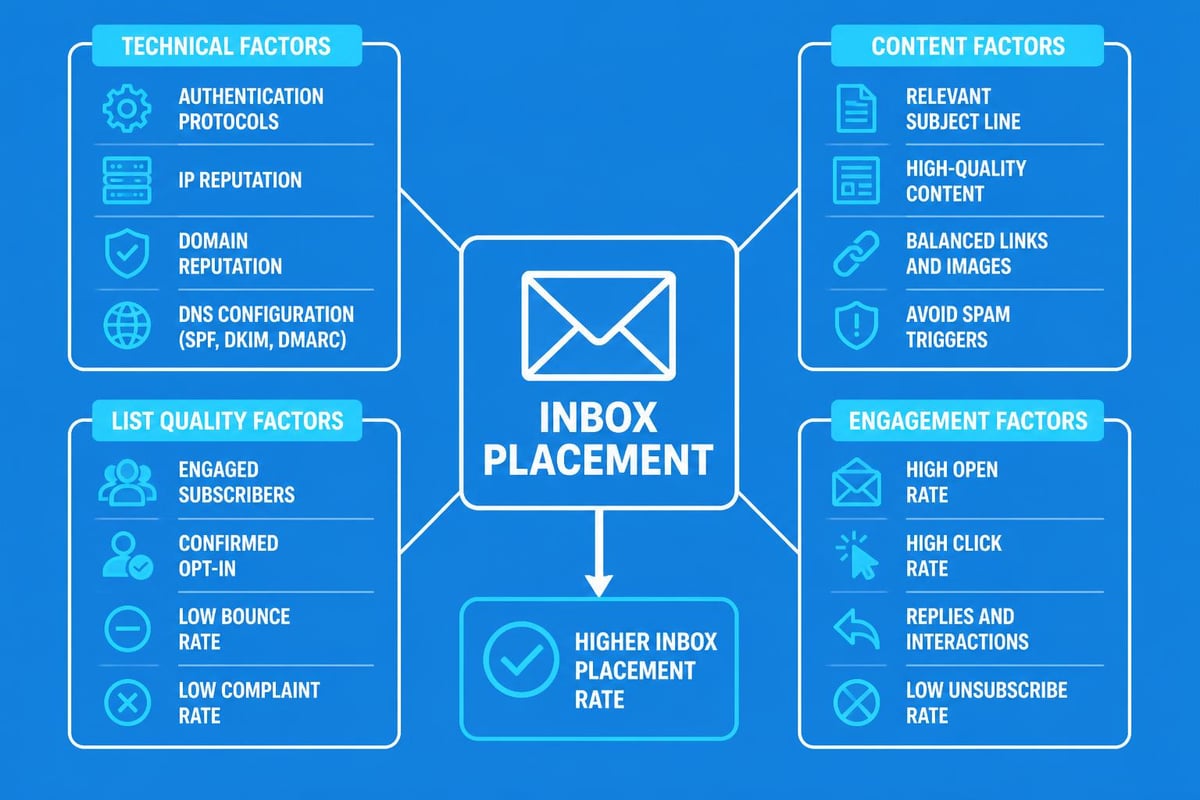
SPF, DKIM, and DMARC records authenticate your emails, proving to inbox providers that you're legitimate. Whilst these acronyms sound technical, most email platforms configure them automatically during setup.
Your antispam policies should align with industry standards and be clearly communicated to subscribers. Transparency builds trust with both recipients and email providers.
List Hygiene Practices
Clean lists perform better across every metric. Regular maintenance involves:
- Removing hard bounces immediately (invalid addresses)
- Monitoring engagement and pruning chronically inactive subscribers
- Honouring unsubscribe requests within 24 hours
- Validating email addresses at point of collection
Clemson University provides comprehensive email security best practices that protect both senders and recipients from cyber threats whilst maintaining deliverability.
Content Strategies for Consistent Engagement
Maintaining subscriber interest requires strategic content planning rather than sporadic inspiration. Develop systems that ensure regular, valuable communication without overwhelming your audience or yourself.
The Content Calendar Approach
Planning emails in advance eliminates last-minute scrambling and ensures balanced messaging. A simple spreadsheet tracking the following suffices:
- Send date and time
- Email type (promotional, educational, announcement)
- Primary topic or offer
- Target segment
- Responsible team member
Wichita State University highlights the benefits of personalization and concise messaging to enhance audience engagement, both of which become easier with advance planning.
Balancing Promotional and Value Content
The 80/20 rule applies well to email marketing: approximately 80% of communications should provide value without asking for purchases, whilst 20% can be directly promotional.
Value content includes:
- Educational articles relevant to your industry
- Tips and tutorials helping subscribers solve problems
- Behind-the-scenes insights humanising your business
- Customer success stories demonstrating real-world applications
- Exclusive content available only to email subscribers
This balance maintains goodwill and positions your brand as helpful rather than purely transactional, making promotional emails more effective when they arrive.
Accessibility Considerations
Inclusive email design ensures everyone can engage with your content regardless of ability. These practices also improve overall usability for all subscribers.
Universal Design Principles
Alt text for images describes visual content to screen reader users whilst also displaying when images fail to load. Each image should have concise, descriptive alt text explaining its purpose or content.
Sufficient colour contrast between text and backgrounds ensures readability for visually impaired subscribers. Minimum contrast ratios of 4.5:1 for normal text and 3:1 for large text meet accessibility standards.
Semantic HTML structure uses proper heading hierarchies and markup, enabling assistive technologies to navigate content logically. Whilst many email builders handle this automatically, verifying structure improves accessibility significantly.
Keyboard Navigation
Some subscribers navigate emails using keyboards rather than mice or touchscreens. Ensure:
- All interactive elements (links, buttons) are keyboard accessible
- Focus states clearly indicate which element is active
- Tab order follows logical reading sequence
- No functionality requires hover states
Mobile Optimisation Beyond Responsive Design
Responsive layouts represent the foundation of mobile email, but true mobile optimisation goes further to accommodate how people actually use smartphones.
Thumb-Friendly Design
Most users hold phones in one hand, using their thumb for interaction. Position critical elements within easy reach of the thumb's natural arc:
- Primary calls-to-action in the centre or lower portions of the screen
- Navigation elements at top and bottom rather than sides
- Sufficient spacing between clickable elements prevents accidental taps
Loading Speed Optimisation
Mobile connections vary in reliability and speed. Optimise for quick loading:
- Compress images without sacrificing visual quality
- Limit total email size to under 102KB when possible
- Minimise custom fonts that require additional downloads
- Test on actual devices rather than relying solely on preview tools
Compliance and Legal Considerations
Easy email marketing still requires adherence to regulations protecting subscriber privacy and consent. Fortunately, compliance follows clear guidelines.
CAN-SPAM and GDPR Requirements
CAN-SPAM Act (primarily applicable in the United States) mandates:
- Accurate sender information and subject lines
- Clear identification of commercial messages
- Physical postal address inclusion
- Honour opt-out requests within 10 business days
- No charge or barrier to unsubscribe
GDPR (applicable to EU residents) requires:
- Explicit consent before adding contacts to lists
- Clear privacy policies explaining data usage
- Easy access to stored personal data
- Right to be forgotten through simple data deletion
- Data portability allowing subscribers to transfer their information
Understanding your data retention policies ensures compliance whilst building subscriber trust through transparency.
Best Practices Beyond Legal Requirements
Exceeding minimum legal standards demonstrates respect for subscribers:
- Double opt-in confirmation prevents list contamination and ensures genuine interest
- Preference centres allow subscribers to choose content types and frequency
- Transparent data practices explain exactly how you'll use subscriber information
- Regular permission renewal for long-inactive subscribers
Platform Selection for Simplicity
Choosing the right email marketing platform dramatically affects how easy email creation and management become. Different solutions cater to varying business sizes, technical abilities, and budgets.
Essential Platform Features
When evaluating options for your small business, prioritise these capabilities:
- Intuitive drag-and-drop builder requiring no coding knowledge
- Pre-built templates covering common use cases
- List management tools for segmentation and organisation
- Basic automation workflows for triggered sequences
- Clear analytics dashboards presenting actionable insights
- Reliable deliverability with established sender reputation
- Responsive customer support when challenges arise
Avoid platforms with excessive complexity designed for enterprise users. Features you'll never use just complicate the interface and increase costs unnecessarily.
Simplifying email marketing transforms it from an overwhelming obligation into a manageable, effective communication channel. By focusing on fundamental principles, leveraging templates and automation, and measuring what matters, small businesses can achieve professional results without requiring extensive technical expertise or marketing budgets. Whether you're just establishing your business email presence or refining existing strategies, prioritising simplicity accelerates results whilst reducing stress. Astonish Email provides the tools and support small businesses need to implement these strategies effectively, turning email marketing from a complex challenge into a straightforward growth driver for your business.